On December 1, 2016, ICANN started enforcing a new transfer policy that modifies the process of changing domain ownership from one registrant to another. The implementation of the policy is imposed on all registrars. We have created this resource page to ensure that all OpenSRS resellers are ready for this policy. We encourage you to review this policy update to familiarize yourself with all of the changes that are being made to the transfer policy.
What is this policy?
The policy we are discussing here is the Transfer Policy, formerly known as “Inter-Registrar Transfer Policy” or IRTP. Up until now, this policy only covered domain transfers between registrars (it’s the policy that mandates the Forms of Authorization to be completed by a registrant prior to a transfer). The new policy also covers the process of changing ownership of the domain from one entity to another (registrant to registrant). Every time a change of registrant takes place, the policy is called upon and a series of confirmation and approval emails are triggered. What’s important to note is that simple updates to a registrant’s first name, last name, organization and email address on a particular domain also triggers the same slew of notification and confirmation emails.
When is it going into effect?
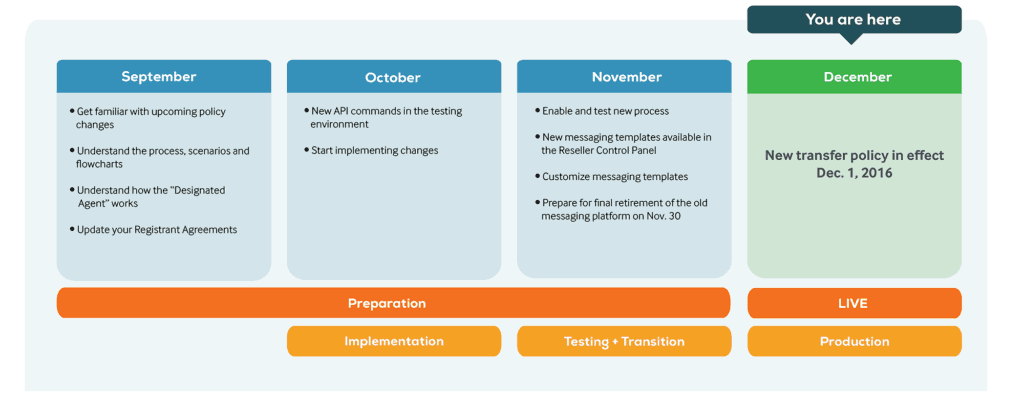
The new transfer policy is effective on December 1, 2016.
New transfer policy timeline
How will it affect your business?
Once the policy is in effect, the impact on resellers and their end users will be visible. It can be summarized as follows:
It will no longer be possible to change the registrant of a domain name with a simple domain modification request.
Any changes to first name, last name, organization or email address fields for the owner of any gTLD domain name will now start a trade process.
The process involves obtaining explicit confirmation from current and new registrants before a change can be completed.
After a change of registrant has been completed, previous and new registrant will receive a confirmation notice informing them that the change has completed
After a change of registrant has been completed, the domain is by default locked for transfers to a new registrar for the following 60 days
What is OpenSRS doing?
At OpenSRS, we believe that the ICANN community who came up with this new policy did a disservice to registrants. The policy requirements do not add any positive element to the experience of managing a domain name, and there has been no consideration how this policy would align with the number of other ICANN mandated policies which are already in place. Nonetheless, OpenSRS is, like all other ICANN accredited registrars, bound by the terms of the Transfer Policy, and needs to follow due process.
Our approach in implementing this policy is:
To design the required processes in a way that meets policy terms and withstands an ICANN audit.
To minimize the actual negative impacts for resellers and end-users.
To leverage policy options such as the “Designated Agent” or transfer-lock opt-outs to streamline the process and reduce registrant impact as much as possible.
Our approach is to ensure resellers do not necessarily need to make adjustments to their systems to support the new policy. OpenSRS will be able to handle all necessary basic requirements, and provide some optional tools and features that allow resellers to optimize handling of this policy.
How does the new process work?
The process starts with the reseller submitting a request to modify the owner of a given domain name.
OpenSRS will then check if the New Registrant has previously accepted Tucows to act as a Designated Agent (DA). If so, OpenSRS would auto-approve the change for the New Registrant. Otherwise OpenSRS will send an email to the New Registrant, asking them
to approve or decline the Change of Registrant,
to confirm that their information is correct (as per Registrant Verification), and
accept Tucows to act as a Designated Agent for all future changes of registrant (optional)
Once the change has been approved by the New Registrant, OpenSRS will check if the Prior Registrant has accepted Tucows to act as a DA. If that is the case, OpenSRS would auto-approve the change for the Prior Registrant. Otherwise, OpenSRS will send an email to the Prior Registrant, asking them
to approve or decline the Change of Registrant, and
opt out of the 60-day registrar transfer lock after a Change of Registrant (optional).
After both approvals have been recorded, OpenSRS will complete the Change of Registrant and send a final confirmation to both Prior and New Registrant which notifies them about the completed process. In this scenario, the New Registrant will not receive a subsequent email to complete the Registrant Verification process, as this has already been completed with the initial confirmation.Even if the email of Prior and New Registrant is the same, the policy requires OpenSRS to send two separate emails. There is no further response required from registrants at this point of the process.
In case the New or Prior Registrant decline a change, or the request times out after 7 days, the entire process is aborted, and the present owner details will stay in place.
To help you better understand how this works, we have simplified the new process into five likely scenarios that may apply to all resellers. Please note: our systems will accommodate all scenarios.
Scenario A
Scenario B
Scenario C
Scenario E
Master Chart
Preparing for the new policy
1) Make sure you present our updated Registration Agreement to all your new and existing customers whenever they submit a domain-related request.
2) If you have integrated with our API, familiarize yourself with the additional API commands that we are providing.
3) To ensure that emails sent to current and new registrants reflect your language and brand, we have added and translated three new templates to our messaging platform:
• Change of Registrant Confirmation for New Registrant
• Change of Registrant Confirmation for Current Registrant
• Notification for Completed Change of Registrant
4) Change the link colours and add a custom URL for your confirmation pages under brand settings within the Reseller Control Panel. If you haven’t uploaded your logo yet, now is a good time to do so. IMPORTANT: confirmation pages will be shown in the same language as the Change of Registrant emails.
5) Enable Designated Agent (turned off by default) for all existing domains.
What is a Designated Agent in the context of this policy?
How can I enable the Designated Agent option for my reseller account?
What is the process if both the New and the Prior Registrant have accepted Tucows as a Designated Agent?
What happens if the current registrant email is invalid or not accessible?
How will I know if my request has timed out or has been denied? How will I know when the change is “approved” by the prior and new registrant contact?
Reseller FAQs
Where do I find details about the new APIs that OpenSRS is providing for this policy?
Should I make the New Registrant accept the Designated Agent option on my own portal?
Is it correct that once a Registrant accepts Tucows as Designated Agent (DA), the Registrant itself has no way to revert this decision, and only the reseller can disable the DA setting?
Will a Current Registrant be able to accept Tucows as a Designated Agent when confirming a Change of Registrant?
Consider the following scenario: Alice as a New Registrant approves a Change of Registrant and accepts Tucows as a DA. The change completes, and the domain is transfer-locked for 60 days.
Is there any way for Alice to still opt-out of the transfer lock?
As all our existing registrants will have accepted the registration agreement, Tucows will be the Designated Agent and auto-approve Change of Registrant requests for them as the Current Registrant. Due to the auto-approve, they will not have the option to opt out of the transfer-lock. Does this mean that in this scenario the transfer lock will apply to all domains coming out of a Change of Registrant process?
Why do I need to submit a domain name when setting the Designated Agent option for an existing registrant via the modify_trade_lock_setting API?
Can I automatically opt-out of the 60-day transfer lock for all of the domains in my reseller account?
What happens if all I do as a reseller is to update the Registration Agreement to include the Designated Agent option, without implementing any technical changes?
Does this implementation of the new transfer policy also apply to country-code top-level domains (ccTLDs)?
How does this new policy affect using whois privacy on domains?
Am I able to customize the emails that go out to new and current registrants?
Am I able to customize the confirmation page that new and current registrants will see after they click the emails?
End-user FAQs
As we have stated before, this is a complex policy that has the potential to disrupt your current processes. To help your end-customers understand these changes, we have developed questions and answers. This section will constantly be updated to ensure your customers have the most current information.